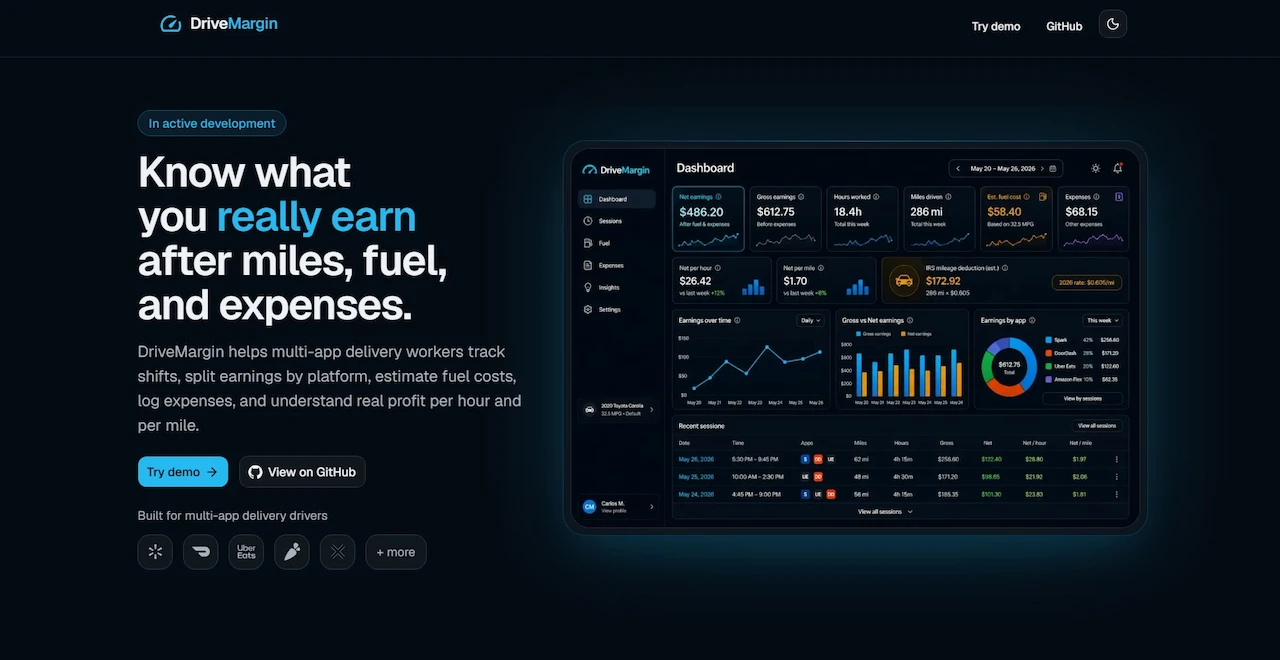
A delivery profitability dashboard that helps independent drivers understand real earnings after miles, fuel, time, and expenses.
DriveMargin is a Next.js public demo for multi-app delivery workers. The current demo milestone includes sample data, editable demo records, dashboard metrics, report period navigation, charts, a guided walkthrough, and temporary browser-based persistence.
DriveMargin is a public demo for a profitability dashboard aimed at multi-app delivery workers. It helps users model a delivery shift as one work session, split earnings by platform, estimate fuel cost, track non-fuel expenses, and review real margin through dashboard metrics and charts.
Problem
Delivery drivers often see gross app payouts without a clear picture of real profitability. A shift can look strong before accounting for miles, fuel, time, tolls, supplies, parking, and other work-related costs. Drivers working across multiple apps also need a single place to understand the full shift instead of treating each platform separately.
Solution
DriveMargin uses a work-session model where one shift can include multiple app earnings, miles driven, hours worked, estimated fuel cost, and related expenses. The public demo uses generated sample data and temporary browser storage so visitors can explore dashboards, edit records, reset demo data, and follow a guided walkthrough without creating an account.
Key features
Public demo workspace
Explore DriveMargin with generated sample data and temporary browser-based persistence.
Multi-app sessions
Track a full delivery shift with earnings from multiple apps in one session.
Profitability dashboard
Review earnings, hours, miles, estimated fuel cost, expenses, net per hour, and net per mile.
Fuel and expense tracking
Separate fuel purchases from non-fuel expenses while using estimated fuel cost for profit calculations.
Report period navigation
Move through demo reporting periods and quick ranges bounded by available sample records.
Guided tour
Walk through the demo workspace and replay the tour from settings.
Tested calculations
Keep financial and demo calculations in pure, testable utility functions.
Tech stack
Frontend
Next.js
React
Data
CH Recharts
Z Zod
Language
TypeScript
Styling
Tailwind CSS
UI shadcn/ui
Testing
Vitest
Gallery
Landing Page
Public landing page explaining how DriveMargin helps delivery drivers understand real profit after miles, fuel, and expenses.
Demo Dashboard
Interactive demo dashboard summarizing net earnings, gross earnings, hours, miles, estimated fuel costs, expenses, mileage deduction, trends, and recent sessions.
Sessions Table
Session management view where demo users can review multi-app delivery shifts, compare miles and hours, and access record actions.
Fuel Purchases
Fuel tracking view for recording gas purchases and keeping fuel cost data connected to vehicle and profitability calculations.
Expenses
Expense tracking view for logging non-fuel costs like supplies, tolls, phone expenses, parking, maintenance, and car washes.
Demo Settings
Editable demo settings where users can adjust the default vehicle, profit goals, mileage deduction rate, and theme preference.
Challenges
01 Defining a data model that treats one delivery shift as the core unit while still supporting multiple apps.
02 Keeping fuel purchases separate from estimated fuel cost so profit calculations stay clear.
03 Making the demo feel interactive without requiring authentication or a real database.
04 Balancing portfolio polish with honest MVP boundaries around backend and persistence.
05 Reducing dashboard complexity so the app stays readable on both desktop and mobile.
What I learned
Improved how to structure a product demo around realistic sample data instead of static mockups.
Practiced separating financial calculations, demo mutations, and UI rendering into clearer layers.
Learned how report periods and sample datasets affect dashboard UX.
Refined accessibility, SEO, responsive layout, and guided-tour behavior for a public demo release.
Strengthened release discipline by separating current frontend capabilities from planned backend work.
Future improvements
->Record a polished product demo video for the landing page.
->Add Supabase Auth and protected user accounts.
->Move from temporary browser storage to Supabase Postgres persistence.
->Add Drizzle schema, migrations, and Row Level Security.
->Build onboarding for real driver settings, vehicles, work apps, and default rates.
->Expand reporting with richer historical trends and production user data.
Interested in how this project was built?
Check out the source code or let's talk about building something amazing together.